The new SetupX Academy · telemetry for Assetto CorsaSee where you lose
every tenth

Every lap you drive is recorded on its own and analysed corner by corner. See where you brake late, where you get on the throttle too late and what to change. And an AI race engineer tells you on the radio while you drive.

Included in Pro, €14.99/month · Cancel anytime

Already a member? Sign in with your email

Backed by Alex Alonso, 10-time Spanish sim racing champion · 50+ drivers

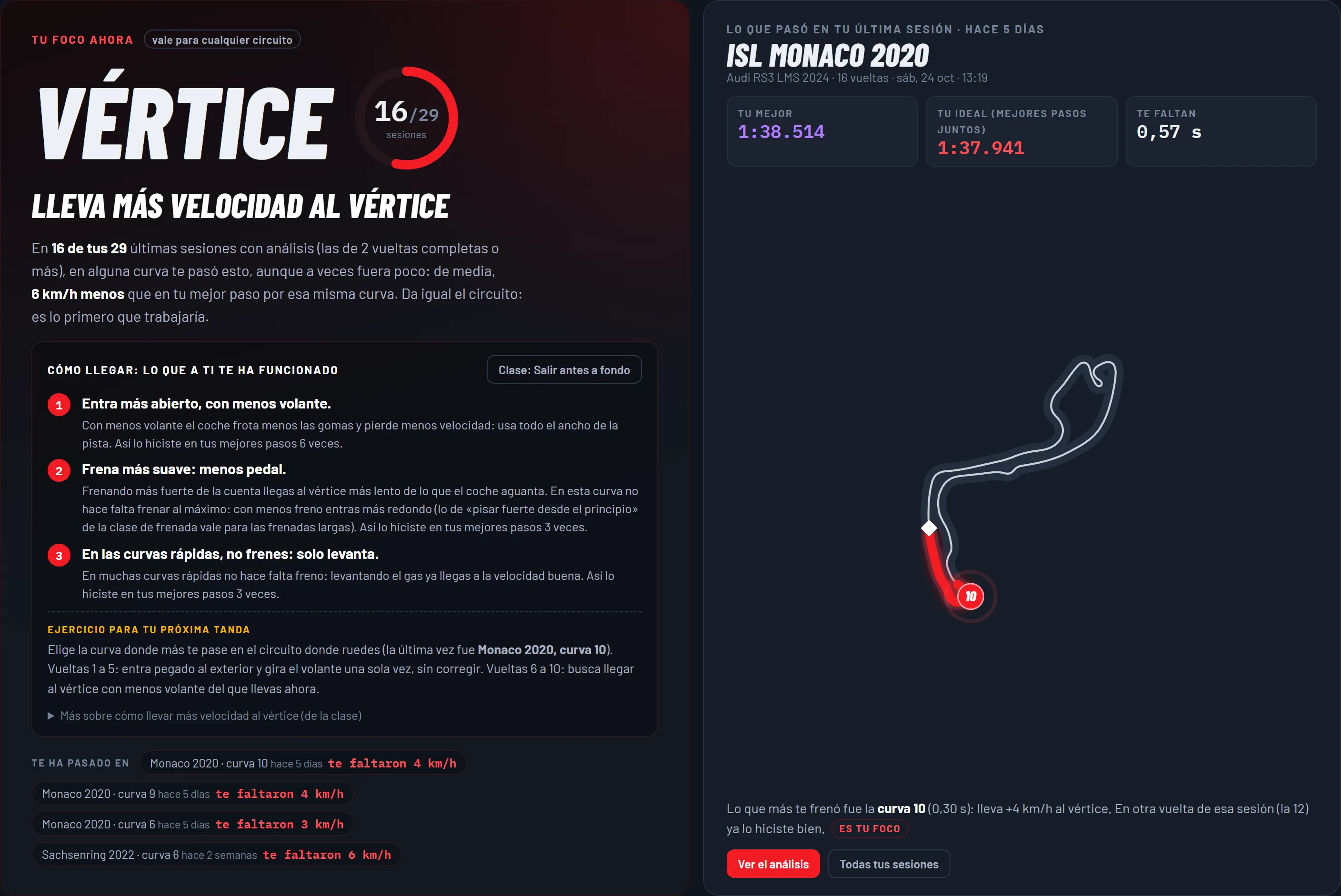
The new SetupX Academy: your focus, your last session at Monaco and your ideal lap

Radio · your engineer

“2:01.80, 0.44 s off your best. Turn 6 is where you lose most: you brake 6 m earlier than on your best lap.”

Best lap

1:34.923 · GT4 Audi R8 · Jarama

−1.2 s from the first lap of the session

Already a member? Sign in with your email: we send you a link and you are in, no password.

Have an SXA- code? Type it here

16,500+laps analysed

6categories in your driving diagnosis

4laps compared at once, with the delta

0things to do: every lap records itself

How it works

You drive.
The Academy takes notes.

  1. 1

    Install the app

    A small Windows app that runs in the background and starts with your PC. You never need to open it.

  2. 2

    Drive in Assetto Corsa

    Practise or race as usual. Every lap is recorded without pressing anything.

  3. 3

    See where to improve

    Open the Academy for the corner-by-corner analysis. Your engineer sums it up on the radio.

Telemetry, plainly

What telemetry is and why it makes you faster

Telemetry is a record of everything you do on every lap: how much throttle and brake you use, how fast you take each corner, which gear you are in and how you move the wheel. In Assetto Corsa that data comes straight from the game, metre by metre.

Drivers use it to stop guessing: compare a good lap with a worse one and you see exactly where the time goes. What people look at most:

  • Braking point: whether you brake earlier or later than on your best lap, and how you release the brake.
  • Apex speed: a few km/h more mid-corner pays off along the whole next straight.
  • When you get back on the throttle: a late exit is one of the most expensive mistakes.
  • Consistency: whether your laps look alike or every one is different.

The catch is that charts without an explanation say little. The Academy reads them for you: it compares your laps, marks the corners where you lose time and tells you what to change.

Lap-by-lap telemetry

See exactly which corner costs you time

Throttle, brake, speed, RPM, gears and steering, with the track map coloured by speed. Compare your laps and see the delta corner by corner.

  • Compare up to 4 laps at once
  • AI diagnosis in 6 categories: smoothness, braking, acceleration, gears, line and efficiency
  • Specific advice for every corner
Start 7-day Pro trial

The most important part of the Academy

The AI tells you exactly what to do

After every lap, the Academy writes a report for you: what you do well, what you need to change, how much time each fix is worth and what happens in every corner. This is a real one.

Lap report · written by the Academy AI

Sachsenring · Audi RS3 TCR

89/100

  • Smoothness92
  • Braking90
  • Acceleration88
  • Gears91
  • Line89
  • Efficiency87

What you need to do

  1. 1

    Braking point in T1−50 ms to gain

    Telemetry shows you braking at 71 km/h against a 94 km/h benchmark. Full 100% pressure is right, but the timing is conservative. Start braking 20–25 metres later on the straight: you'll carry more entry speed and get the time back.

  2. 2

    Brake-to-throttle transition in T1−60 ms to gain

    A 100 ms hesitation between the end of braking and the throttle points to an abrupt brake release. Practise a progressive overlap: come off the brake as you feed in the throttle, not one after the other.

  3. 3

    Confidence on the throttle after braking−40 ms to gain

    You only use 73% throttle on the exit of T1 against a 78% benchmark. Build confidence step by step: the car has the grip, trust it.

Corner by corner

  • T188

    Biggest potential. Heavy braking done right, but 23 km/h under the benchmark at the entry point. Full 100% pressure is the right technique; the timing is conservative.

  • T295

    Taken completely flat with a clean entry at 131 km/h. Barely 2% speed loss, an excellent line with no corrections needed.

  • T394

    Smooth and consistent. Entry at 93 km/h, clean apex at 88 km/h. Light, well-modulated trail braking and a strong exit at 107 km/h.

  • T488

    Almost flat with a light brake dab (23% max). Entry smoothness drops to 63: there is a bit of tension in the steering you can polish with confidence.

  • T593

    Heavy braking well executed from 200 km/h. 93% peak pressure, progressive trail braking to a 165 km/h apex. Strong exit at 168 km/h with decisive throttle.

  • T698

    Excellent. Minimal brake dab (23%) with perfect modulation. Entry 149 km/h, apex 135 km/h, exit 151 km/h. Best score on the lap: your reference.

  • T794

    The biggest speed drop on the lap (25%), but the technique is smooth and controlled. Light, well-timed brake dab (23%), entry 146 km/h, apex 109 km/h. Exit at 121 km/h with progressive throttle.

Next steps

  1. Practise a later entry into T1. Move your braking point later step by step across sessions (5 metres each lap) until you reach 94 km/h. Feel how the car responds and build confidence.
  2. Brake-to-throttle drill. Work on T1 focusing on overlapping the pedals: brake and throttle shouldn't be 100 ms apart, they should overlap.
  3. Raise apex speed in T4 and T7. Session by session: they are high-confidence corners, you only need to give yourself permission to carry more throttle.

Real analysis of one of Alex Alonso's laps, 17 Oct 2026 · translated from Spanish
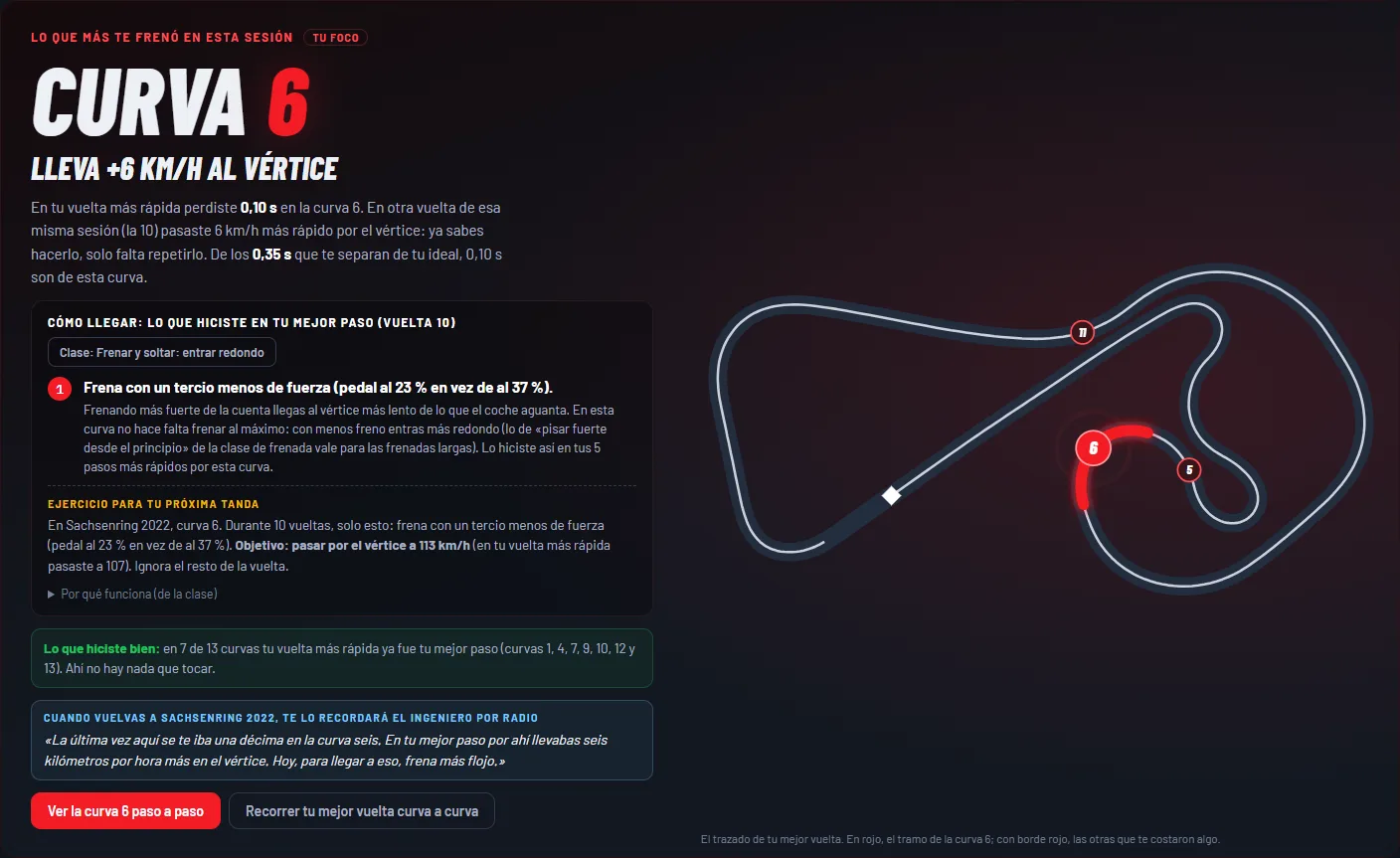
Every session

What slowed you down most, and how to fix it

Open a session and see the corner that cost you the most time, what you did differently on your best pass through it and a drill for your next run. And when you go back to that track, the engineer reminds you over the radio.

  • Your lap corner by corner, against your best pass through each one
  • Your car in the session: braking, tyres, camber, bump stops and differential
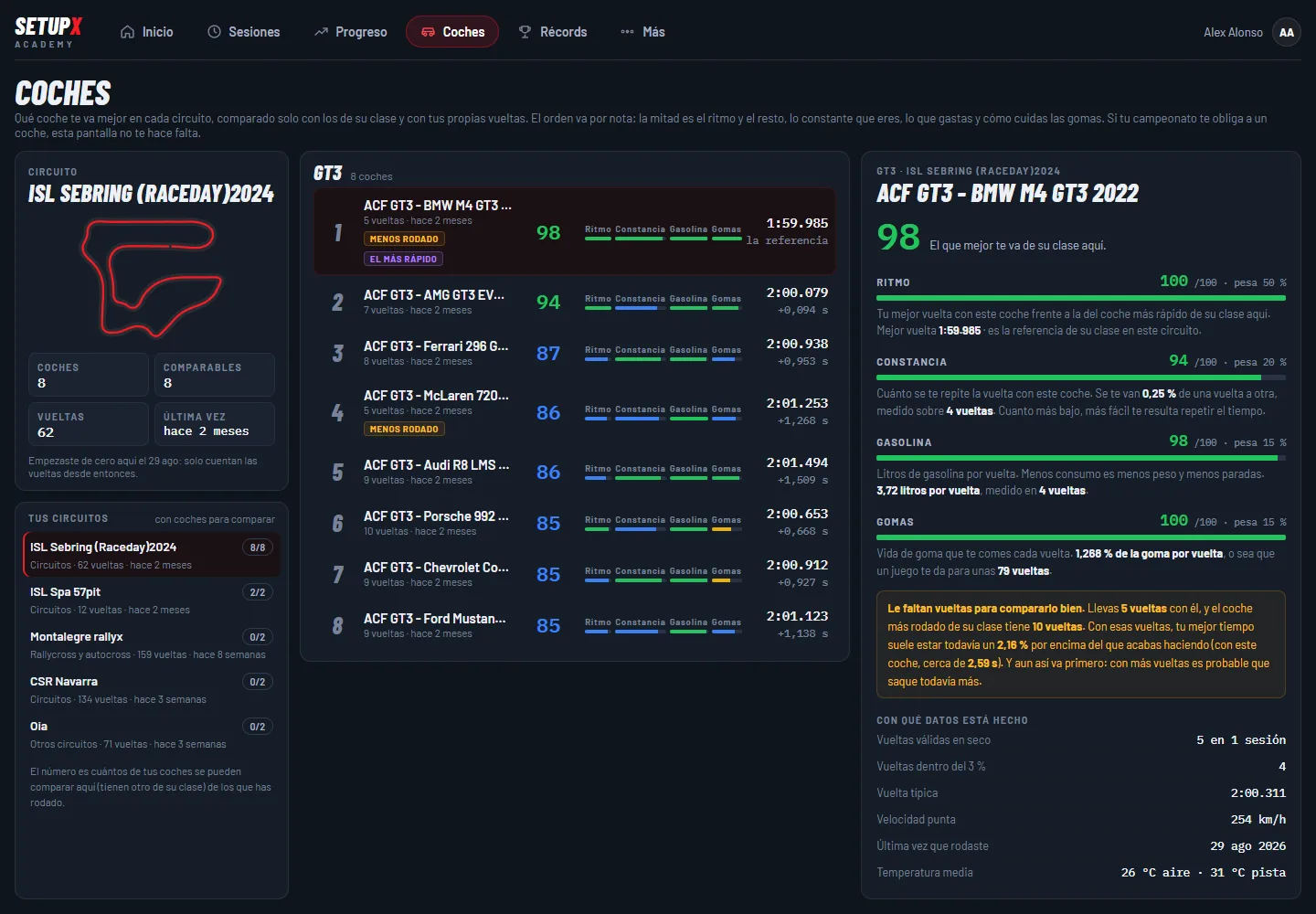
  • Which car suits you best at each track, against the cars in its class
A session in the SetupX Academy: the corner that slowed you down most and the drill to fix it Which car suits you best: 8 GT3 cars at Sebring ranked by pace, consistency, fuel and tyres

Race engineer with AI

A race engineer with AI, on the radio

Your engineer watches every lap and calls it on the radio, in-game: where you lost time and which corner to work on. Push to talk and ask it anything about your driving. In English or Spanish.

  • He marks those corners on the in-game map
  • Ask by voice: fuel, tyres, lap times
  • Requires Content Manager + Custom Shaders Patch (free)

Included in Academy and Pro

Radio · your engineer

2:01.802 +0.44 s

0:13

“2:01.80, 0.44 s off your best lap. Sector 3 is where it goes: in Turn 6 you brake 6 m earlier than on your best lap, and Turn 7 costs you 0.07 s more. Clean those two and you get back more than half of it.”

Built from a real lap: Alex Alonso, Toyota GR86 Cup, Jerez
The engineer's voice, the same one you hear in the game

Which car suits you best Beta

Your fastest car, on every track

The Academy compares the cars you have driven on each track and tells you which one you are fastest and most consistent in.

  • Pace, consistency and top speed
  • Fuel use and tyre wear
  • By car class, so you compare like with like
Real example · Sebring · GT3
  1. 1BMW M4 GT31:59.985 98
  2. 2Mercedes-AMG GT3 Evo2:00.079+0.094 94
  3. 3Ferrari 296 GT32:00.938+0.953 87
  4. 4McLaren 720S GT3 Evo2:01.253+1.268 86
  5. 5Audi R8 LMS GT3 Evo II2:01.494+1.509 86
  6. 6Porsche 911 GT3 R (992)2:00.653+0.668 85
  7. 7Corvette Z06 GT3.R2:00.912+0.927 85
  8. 8Ford Mustang GT32:01.123+1.138 85

BMW M4 GT3Your best car hereTop speed 254 km/h · 5 laps

  • Pace100
  • Consistency94
  • Fuel98
  • Tyres100

Score = pace 50% · consistency 20% · fuel 15% · tyres 15%

Alex Alonso's real data: 8 GT3 cars and 62 laps at Sebring. Tap a car to see its score.

Driving diagnosis

The 6 things it checks on every lap

Every lap gets a score from 0 to 100 in six categories, with a tip for each one, so you know what to work on first.

01

Braking

Whether you release the brake abruptly, press throttle and brake together or reach the apex off both pedals. Braking hard and trail braking are not penalised: that is good driving.

02

Acceleration

How you exit each corner: whether you get back on the throttle late, hesitate or stamp on it and lose the rear.

03

Line

Your apex speed compared with your exit speed, and where you get back on the throttle. A good line shows on the next straight.

04

Smoothness

Steering corrections inside the corner. A tidy driver barely corrects: every correction costs time and tyres.

05

Gears

Whether you sit on the rev limiter for too long or run very low revs on a straight. Touching the limiter briefly does not count.

06

Efficiency

Stretches of straight where you are on neither throttle nor brake (coasting). Every metre like that is time given away.

And also

Training, for real

  1. Driving lessons

    Driving technique for every level, from the basics to what race drivers do.

  2. Compare with your team

    Create a team with a code and compare your telemetry with your teammates: who brakes later, who exits each corner better.

  3. Nothing to set up

    The Windows app records every lap in the background and your Academy opens in the browser: you sign in with your email, no password.

Reviews

What drivers say

The Academy is insane: it tells you exactly what you need to do to go faster, even on hillclimbs and rallies. And the engineer telling you in real time is incredible. Highly recommended.
Carlos RodríguezAcademy & engineer
The setups alone make it worth it, but the Academy is top: everything explained really well, plus lessons to improve. And then there's the engineer. Easily one of the best out there.
Samuel LópezSetups & Academy
I signed up without really knowing how it worked, but it's very easy to use. You download the app and everything runs by itself, you don't have to touch anything. I loved that.
Cristian ÁlvarezEase of use
Incredible how the car changes with the setups, very fast and great work. 100% recommended for racing.
Brian RamirezSetups · BGI Motorsport

Translated from Spanish.

No card needed

Try SetupX Pro free for 7 days

  • The Academy analysing every lap, corner by corner
  • The AI race engineer talking to you on the radio
  • Custom setups for all your cars and tracks, within minutes (up to 10 a day)

No card. It does not renew on its own: when it ends, you decide. By starting you accept the privacy policy.

Pricing

Academy with setups

Monthly Yearly up to 5 months free

Academy

Telemetry and engineer, no setups

€15/month

Cancel anytime

  • Telemetry and Academy
  • Radio race engineer
  • Lessons and team comparison
  • Unlimited custom setups (up to 10 a day)
Start with Academy

Recommended

Pro

Everything in Setups, plus the race engineer with AI and the Academy

€14.99/month

Cancel anytime

  • Telemetry and Academy
  • Radio race engineer
  • Lessons and team comparison
  • Unlimited custom setups (up to 10 a day)
Start with Pro or try it free for 7 days →

Card or PayPal · Cancel anytime, no contracts

Before you start

Is the Academy for you?

It's for you if…

  • You want to find lap time with data, not by feel
  • You race in leagues or want to start
  • You drive Assetto Corsa with a wheel
  • You're new or already quick: there are lessons for every level

It's not for you if…

  • You play with a keyboard or a controller
  • You don't use Assetto Corsa (the original): ACC and EVO not yet
  • You want results without practising
Alex Alonso

Backed by

Alex Alonso

10-time Spanish sim racing champion (RFEDA, the Spanish motorsport federation) and founder of SetupX.

10Spanish championship titles

+50drivers already race with SetupX

FAQ

Before you start

Assetto Corsa (the original) on a Windows PC, a wheel and the SetupX app. To hear the engineer in the game, Content Manager with Custom Shaders Patch.
No. The app starts with your PC and records every lap in the background. When you finish, open the Academy and the analysis is there.
The Academy (telemetry, radio engineer and lessons) comes with Pro (€14.99/month), together with unlimited custom setups (up to 10 a day) that land in your game within minutes.
Today only with the original Assetto Corsa. If you are interested in another sim, join the newsletter and we will let you know.
Tap My account at the top (on your phone, it is in the ☰ menu). Type your email and we send you a link: open it and you are in, no password. Next time, your browser remembers you and you go straight in.
Yes, no commitment. Cancel from My account and keep access until the end of the period you paid for.
For every lap: throttle, brake, speed, RPM, gear, steering angle and track position, plus sector times, air and track temperature and track conditions.
No. You don't export anything or install other software: the app records on its own and the Academy explains what each chart means and what to change.

Your next lap, with data

Try Pro free for 7 days, no card: Academy, engineer and custom setups.

Start 7-day Pro trial